Admin Settings
A architecture project which consolidated the next generation admin experience for a legacy learning management software
2024
Admin Experience
LMS
Redesign
Admin Settings
A architecture project which consolidated the next generation admin experience for a legacy learning management software
2024
Admin Experience
LMS
Redesign
Admin Settings
A architecture project which consolidated the next generation admin experience for a legacy learning management software
2024
Architecture
LMS
Role
Lead designer
Timeline
1 month
Role
Lead designer
Timeline
1 month
Role
Lead designer
Timeline
1 month

The Context
Company acquisitions resulted in multiple admin interfaces across the learning management software product ecosystem. System Administrators were managing duplicative settings across separate platforms, each with different navigation, naming conventions, and UI patterns.
This fragmentation led to:
long, unpredictable click paths
duplicated configuration work
inconsistent workflows across modules
With this disjointed experience, the cross module upsell to current LMS customers was difficult, resulting in a low attach rate of 7.4%. This meant a missed potential of $600M USD revenue.
How might we create a cohesive systems-level experience that reduces admin workload and increases cross-platform adoption?
Company acquisitions resulted in multiple admin interfaces across the learning management software product ecosystem. System Administrators were managing duplicative settings across separate platforms, each with different navigation, naming conventions, and UI patterns.
This fragmentation led to:
long, unpredictable click paths
duplicated configuration work
inconsistent workflows across modules
With this disjointed experience, the cross module upsell to current LMS customers was difficult, resulting in a low attach rate of 7.4%. This meant a missed potential of $600M USD revenue.
How might we create a cohesive systems-level experience that reduces admin workload and increases cross-platform adoption?
The Solution
We unified system settings into a single consolidated structure, reducing navigation time by 80%. We also increased admin efficiency by consolidating configurations into ONE workflow across all modules.
We unified system settings into a single consolidated structure, reducing navigation time by 80%. We also increased admin efficiency by consolidating configurations into ONE workflow across all modules.
Before
Before

After
After

The Process
Discovery: The Root of Fragmentation
We partnered with Sales and CSM teams and surfaced key issues driving low attach rate and the inability to scale for large enterprise admins:
Admins maintained two sets of similar settings across modules
Extremely long click paths to reach critical configuration areas
No centralized view of system settings
Disconnected UI and workflows for identical settings
Unclear and inconsistent naming conventions
Discovery: The Root of Fragmentation
We partnered with Sales and CSM teams and surfaced key issues driving low attach rate and the inability to scale for large enterprise admins:
Admins maintained two sets of similar settings across modules
Extremely long click paths to reach critical configuration areas
No centralized view of system settings
Disconnected UI and workflows for identical settings
Unclear and inconsistent naming conventions
Iteration
Information Architecture Exploration
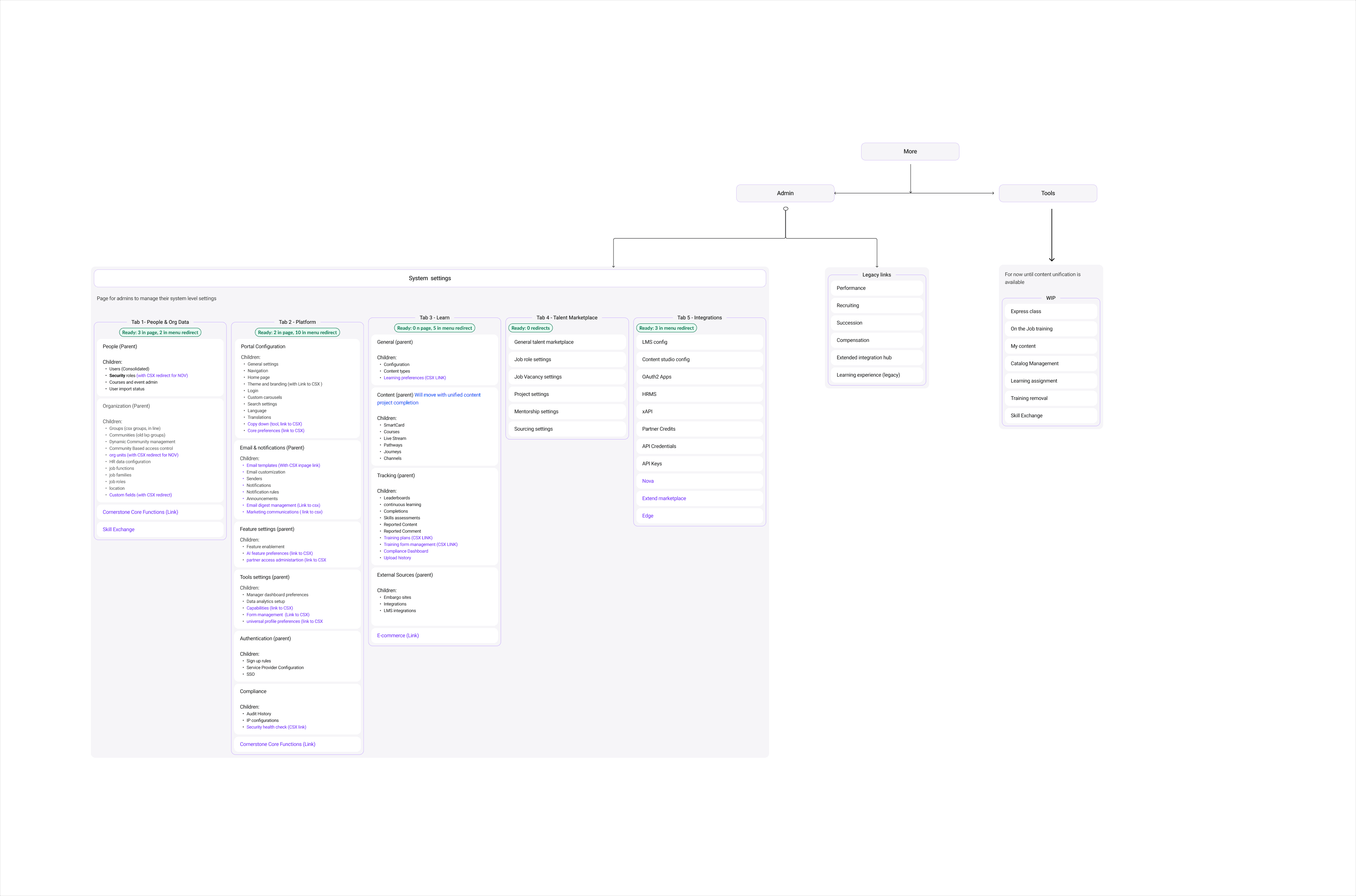
We first mapped a maximum-case scenario: every possible module enabled for an enterprise customer. This allowed us to understand the upper limit of complexity before designing a scalable solution.
Cross-functional technical alignment
Working with PM + Dev, we defined:
system of record for each setting
which settings could be consolidated in the beta timeline
priority levels (P0/P1) for each setting
dependencies across modules
Performed a card sorting exercise to group settings
This resulted in a prioritization that allowed us to consolidate Users, Groups, Community, and Organizational Units in the first release phase.
Iteration
Information Architecture Exploration
We first mapped a maximum-case scenario: every possible module enabled for an enterprise customer. This allowed us to understand the upper limit of complexity before designing a scalable solution.
Cross-functional technical alignment
Working with PM + Dev, we defined:
system of record for each setting
which settings could be consolidated in the beta timeline
priority levels (P0/P1) for each setting
dependencies across modules
Performed a card sorting exercise to group settings
This resulted in a prioritization that allowed us to consolidate Users, Groups, Community, and Organizational Units in the first release phase.

Navigation Framework
I explored multiple scalable navigation frameworks and evaluated them against:
consistency with existing system patterns
future modules
cognitive load
ease of discoverability
We aligned on a structure of:
Primary tabs across the top
Secondary expanding navigation on the left
Optional tertiary tabs for settings requiring more segmentation
This became the foundation for the unified system experience.
Navigation Framework
I explored multiple scalable navigation frameworks and evaluated them against:
consistency with existing system patterns
future modules
cognitive load
ease of discoverability
We aligned on a structure of:
Primary tabs across the top
Secondary expanding navigation on the left
Optional tertiary tabs for settings requiring more segmentation
This became the foundation for the unified system experience.

Validate
We conducted usability sessions with 7 internal system administrators.
Findings:
Users navigated 4 minutes faster on average
The consolidated settings reduced confusion and duplicated effort
The overall layout was described as “significantly easier”
A major insight emerged:
Users expected all system settings to live under the global “Admin” dropdown rather than being distributed.
We immediately revised the navigation to match mental models.
Validate
We conducted usability sessions with 7 internal system administrators.
Findings:
Users navigated 4 minutes faster on average
The consolidated settings reduced confusion and duplicated effort
The overall layout was described as “significantly easier”
A major insight emerged:
Users expected all system settings to live under the global “Admin” dropdown rather than being distributed.
We immediately revised the navigation to match mental models.
Final Mocks


The Outcome
The Outcome
With 80% time savings, admin could finally focus on the tasks that matter which in the long run would save around 20 minutes of time per session per admin user, resulting in time and money savings.
With 80% time savings, admin could finally focus on the tasks that matter which in the long run would save around 20 minutes of time per session per admin user, resulting in time and money savings.
Key Learnings
Key Learnings
Key Learnings
This project required deep architecture thinking, strong cross-functional collaboration, and the ability to guide a team through ambiguity. Unifying system settings not only improved admin efficiency but also created a more compelling path for cross-module adoption — directly supporting one of the company’s largest revenue opportunities.
This project required deep architecture thinking, strong cross-functional collaboration, and the ability to guide a team through ambiguity. Unifying system settings not only improved admin efficiency but also created a more compelling path for cross-module adoption — directly supporting one of the company’s largest revenue opportunities.